8 min read
School computers should be judged by their full cost
Compare school computers by purchase price, repairs, warranty, RAM and SSD access, engineer visits, and the frequency of failures.
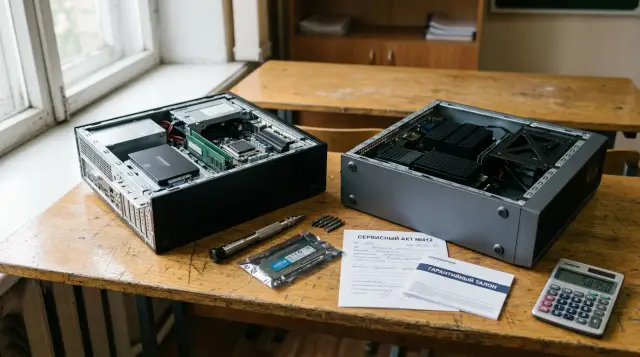
A cheap desktop saves money only on the purchase line. A school also pays for classroom downtime, engineer visits, parts, spare machines, and the staff time spent documenting each fault. If these costs are left out before the tender, the lowest bid often becomes the most expensive fleet after three or four school years.
I would not choose between a "cheap" and a "good" computer by instinct. A single calculation model is more useful for a school: purchase price, access to RAM and SSD, the cost of a typical repair, warranty terms, and the expected frequency of damage. It does not require an exact prediction of the future. It makes suppliers answer the same questions and shows which unknown could consume the budget.
The price tag is not the price of a working seat
The total cost of a workstation starts with the purchase, but it does not end there. The calculation includes delivery and commissioning, warranty and non-warranty repairs, work by school staff or a contractor, spare parts, reserve devices, and disposal. Licences and electricity can also be added if the compared options differ noticeably in those areas. If they are the same, do not clutter the table with figures that cannot change the decision.
Use this expression for a basic comparison over the service life:
TCO = P + D + S + R + O - V
R = N × Y × F × (Cpart + Clabor + Cvisit + Cdowntime)
Here, P is the purchase price, D is delivery and installation, S is the cost of the reserve pool, R is repairs, O is other costs that differ, and V is residual value. In the repair formula, N is the number of computers, Y is years of use, and F is the number of repair incidents per computer per year. The remaining values stand for parts, labour, a site visit, and downtime.
Downtime cannot be valued at zero merely because the school does not pay a pupil a wage. It has a material cost: the teacher changes the lesson plan, an administrator moves the class, and a technician issues and receives a replacement computer. Set a conservative internal hourly rate and apply it consistently to every option. Even a low rate will expose the difference between a twenty-minute repair and sending a closed unit to a service centre for a week.
The comparison period must match the real refresh cycle, not the term of a budget request. If the school normally uses computers for five years, a one-year model hides almost all the effect of repairability. A ten-year model is just as unhelpful when equipment is retired after five.
Access to RAM and SSD has a measurable price
Removable RAM and SSDs have no value merely because they are removable. They reduce diagnostic time, allow a failed part to be replaced on site, and provide an inexpensive upgrade path when educational software needs more memory or storage. This benefit must be converted into minutes and money, or the requirement that a computer is "easy to upgrade" will remain an attractive phrase in a specification.
Ask the supplier to show a normal production unit and perform two operations: reach the memory and remove the drive. Measure the time from a powered-off, assembled computer to the removed part and back again. Record the number of screws, the type of tools, whether cables must be removed, and whether any clips are single use. A video or test record is more useful than a marketing diagram because the purchase will receive the production design.
Record four results for each operation:
- how many minutes access takes for a technician seeing the model for the first time;
- whether a special tool or proprietary part is needed;
- whether compatible RAM or SSDs can be bought from several suppliers;
- whether the warranty remains valid after an authorised replacement.
The last question must not be guessed. A case that opens does not mean the school may open it without losing the warranty. In the tender documents, request a written description of permitted actions: replacing modules, moving data, cleaning dust, and removing the cover. If the supplier allows only its own service team to work on the machine, add the visit price and waiting time to the model even when the part itself is inexpensive.
There is an opposite mistake: treating every removable component as an advantage. If the slot is hidden below the motherboard and disassembly takes forty minutes, it provides almost no practical repairability. If the memory is soldered but the supplier guarantees an on-site system-unit replacement by the next working day with no visit charge, the closed design may be acceptable. Compare the actual route from a fault to a working seat, not an ideology about cases.
A warranty matters only with a recovery time
A long warranty does not say how many school days a computer will remain faulty. A five-year warranty that requires equipment to be sent to another city may help less than a three-year warranty with on-site diagnostics and a clear replacement time. The table needs separate fields for warranty term, response time, restoration time, and logistics charges.
Demand answers for specific cases. Who removes the drive if it contains personal data? Can the drive stay at the school? Who pays for shipping? What happens if the required part is unavailable? Is an equivalent replacement provided? When does the clock start: after an email, after registration of a ticket, or after the engineer arrives? "Service during the warranty period" answers none of these questions.
It helps to separate faults by severity. An SSD failure needs a fast local procedure because replacing a standard drive is usually straightforward. A motherboard repair may take longer if the school receives a replacement machine. A broken port or damaged power button may not be covered by warranty, so the paid repair price is needed in advance. One average time for all failures hides the incidents most likely to disrupt lessons.
A warranty promise should be counted in money in two ways. First, set the cost of parts and labour to zero for covered incidents. Then retain the internal cost of handling the ticket, any visit, and downtime. A warranty rarely makes those costs zero. If the supplier assumes them, that obligation must appear in the contract rather than being implied by a sales representative at a meeting.
The reserve pool also depends on service. With restoration in one working day, a school may need only two or three spare machines per classroom. When repairs take several weeks, the reserve must grow. Do not use the same reserve percentage for every offer, as that gives slow service an undeserved advantage in the table.
Failure frequency cannot be invented
The most disputed cell in the model is the frequency of repair incidents. It cannot be replaced by a brand's general reputation or a supplier's promise. The best source for an operating school is its own ticket log from comparable classrooms. If there is no log, a pilot batch with structured records will provide more evidence than another presentation.
Separate hardware failure from accidental damage. Drive failure, overheating, and a faulty power supply depend on design and component quality. A broken audio port, spilled water, and a cable pulled out by force depend more on pupil age, desktop placement, and classroom management. The supplier covers the first group within its warranty terms. The school still pays for the second, so the repairability of ports and cases matters.
A minimum log can be kept in a spreadsheet with these columns:
date,room,asset_id,model,incident_type,failed_part,warranty,minutes_staff,visit_cost,part_cost,downtime_hours,resolution
2026-09-14,204,PC-204-07,Model-A,accidental,front_usb,no,35,12000,4500,26,repaired_on_site
One row represents one incident, not one email to the service team. It is best to restrict incident_type to hardware, accidental, software, and unknown. Software failures should not be attributed to case reliability. Keep unknown only until diagnosis, then correct it, or unknown incidents will quickly become the largest category.
For a new model with no history, use three scenarios rather than one confident figure. For example, base the low scenario on the best comparable classroom, the base scenario on the median of the school's fleet, and the high scenario on the worst comparable classroom. Do not copy someone else's percentage without a description of device age, workload, and the definition of a failure. Someone else's precise figure is often less honest than your broad range.
Compare the winner in all three scenarios. If one computer is cheaper only when failures are rare, the decision is fragile. If the repairable model wins even in the base scenario, the premium has support from the calculation. If the result changes because of one unknown parameter, aim the pilot directly at that parameter.
Price an engineer visit per incident
A contract with a service company often hides the visit cost inside a subscription fee. For comparing equipment, the price still needs to be converted to one repair incident. Otherwise, an offer with expensive visits looks cheap beside a model that the school technician can service.
Break an incident into work before arrival, the visit itself, the repair, and ticket closure. School staff check the power, describe symptoms, arrange access, meet the engineer, oversee the transfer of a part, and update the asset register. Those minutes recur with every request. Multiplying only the contractor's visit tariff understates the actual workload.
If a contractor supports several schools for a fixed sum, take the annual share of the contract attributable to hardware requests and divide it by the number of such requests. Count surcharges for a remote area, urgency, and a repeat visit separately. When data is not yet available, enter a range. A zero cell means the cost is known not to exist, while a blank cell means it is unknown. A sound model treats these as different states.
On-site repair is not always cheaper. An engineer may travel twice to a remote school, first to diagnose and then to return with a part. Shipping a modular unit to a district centre may cost less if the classroom already has a replacement. Compare the whole route rather than the phrase "field service."
Ask each bidder for prices on five non-warranty operations: SSD replacement, adding RAM, power supply replacement, power button repair, and replacement of a damaged port. This short list quickly exposes closed designs, unavailable parts, and undefined tariffs. A price "after diagnosis" is unknown and belongs in the high scenario, not in a zero cell.
One table makes the offers comparable
A working model fits in an ordinary spreadsheet and needs no complex procurement system. Give each commercial offer its own column, and keep only verifiable inputs and calculated costs in the rows. Beside every figure, store its source: a contract, a supplier's answer, a disassembly record, the school's log, or a committee assumption.
The basic structure for one computer looks like this:
A: Показатель
B: Дешевая модель
C: Ремонтопригодная модель

Цена закупки
Годы эксплуатации
Доставка и установка
Резервный фонд на одно место
Случаев в год, низкий / базовый / высокий
Средняя цена детали
Минуты сотрудника на случай
Внутренняя стоимость часа
Цена выезда
Часы простоя
Стоимость часа простоя
Остаточная стоимость
TCO, низкий / базовый / высокий
The base TCO cell can use a formula like this:
=Purchase+Delivery+Reserve+Years*FailuresBase*(Part+Visit+(StaffMinutes/60)*StaffRate+DowntimeHours*DowntimeRate)-Residual
This is not a universal accounting standard. It is a transparent rule for a specific procurement. The committee can change the cost components, but it must do so before opening price bids. Otherwise, the formula can easily be adjusted to favour a model that has already caught someone's eye.
Consider an illustrative example with 100 workstations and five years. Option A costs 160,000 tenge and option B costs 195,000. For A, the committee assumes 0.22 incidents a year, 18,000 tenge for parts and labour, 12,000 for a visit, and 8,000 for handling and downtime. For B, the assumptions are 0.14 incidents, 12,000 for parts and labour, no external visit charge when local replacement is allowed, and 4,000 for handling and downtime.
Over five years, A's expected repairs cost 100 × 5 × 0.22 × 38,000 = 4,180,000 tenge. For B, the result is 100 × 5 × 0.14 × 16,000 = 1,120,000 tenge. The purchase premium for B is 3,500,000 tenge, while the expected repair difference is 3,060,000. Before reserve and residual value, A is still cheaper by 440,000 tenge. The committee should not declare B the winner merely because it has a convenient case. It needs to check whether B reduces the reserve, lasts longer after a RAM upgrade, and whether the assumed frequencies are reliable.
The example matters because the repairable model does not have to win. A calculation model must be able to say, "The premium does not pay back." Otherwise, it is decoration for a decision made in advance.
Tender conditions should test the outcome
A technical specification should not dictate one internal layout without connecting it to the school's work. A requirement for "two memory slots" can be met even when those slots cannot be reached without complete disassembly. It is better to describe a testable outcome: a technician using a normal screwdriver reaches the RAM and SSD within a stated time, does not damage the case, and does not lose the warranty.
A short evidence form can accompany the bid. The supplier states the memory type and maximum capacity, drive form factor, access procedure, actions the school may perform, response and recovery times, service locations, prices for typical non-warranty work, and the availability period for compatible parts. The committee checks some of these statements on a sample before signing the contract.
Do not turn repairability into the only criterion. A computer must meet the educational workload, security requirements, room conditions, and school infrastructure. A weak processor cannot be excused by a convenient cover. Nor should the school buy excess performance "for the future" when its educational applications and refresh plan have no use for it.
Acceptance conditions should cover the production configuration, not a specially prepared demonstration sample. Record the RAM, SSD, and power supply markings, firmware version, included cables, and actual access time. If the supplier may substitute equivalent components, the contract must preserve compatibility, performance, and repair terms.
GSE.kz manufactures L200 series desktop PCs in Kazakhstan and has a nationwide service network with 24/7 technical support. When comparing that offer with others, the committee should still request the same measurable times, operation prices, and component-access rules, because equipment origin does not replace the calculation.
A pilot should answer unknown questions
A pilot batch is not for collecting general impressions from teachers. It should measure the parameters that change the winner in the model. If the unknown is failure frequency, test devices in ordinary classrooms. If the dispute concerns service time, let the school technician disassemble and reassemble a sample. If remote service poses the risk, submit a test ticket and measure the entire path to restoration.
Set criteria and the observation period before the pilot starts. Record classroom workload, pupil age, operating hours, peripherals, and technician actions. Otherwise, the committee will collect opinions with no common basis. A model in a locked computer room cannot be compared with one near a library entrance where people use its ports throughout the day.
A short pilot says almost nothing about long-term reliability, but it can test access to parts, image compatibility, noise, cable retention, support, and the real warranty procedure. Do not grant it more evidential weight than that. Refine failure frequency through the operating log and revise the next procurement plan.
The decision after the pilot should leave an audit trail. Save the spreadsheet version, source answers, disassembly record, and reasons for the chosen rates. Replace assumptions with actual data after a year. The next committee can then avoid restarting the argument and see where the forecast was wrong.
Repairability wins only with honest inputs
A school does not need the cheapest case or the easiest case to repair at any cost. It needs a specified number of working seats on every school day at a known cost. Total cost of ownership connects this requirement to the tender price and prevents one attractive property from replacing the whole analysis.
Before publishing the procurement, the committee should fix five things: the period of use, three incident-frequency scenarios, permitted RAM and SSD operations, the price of the complete service route, and the cost of downtime. It should then vary every disputed figure and see whether the winner remains the same. This sensitivity analysis is more useful than another decimal place.
If the cheap PC wins in the low, base, and high scenarios, buy it without guilt, but contract the service terms and parts supply. If the repairable model pays back in the base scenario, the premium has a clear basis. If the outcome jumps because of one unverified figure, the procurement is not ready to be announced: measure that figure first.
Check the break-even threshold separately. Keep every base value fixed and change only the incident frequency for the cheap model until the TCO of both options is equal. The resulting value answers a practical question: how many repairs per year must occur before the repairability premium pays back? If the threshold is far above the schools historical level, the more expensive model is unlikely to pay for itself through repairs. If it sits inside the observed range, the decision depends on the quality of the source log and the service terms.
Test the visit price, downtime, and service period in the same way. The committee does not need ten polished charts. A table with four disputed parameters, their base values, break-even points, and the documents supporting each figure is enough. This separates ordinary uncertainty from dangerous uncertainty. A ten percent error in the price of an inexpensive part may change nothing, while one extra visit per incident can reverse the result for a remote school.
Estimate residual value cautiously. The ability to move standard memory and storage into a reserve computer has real value, but it cannot be counted twice as both a repair saving and the full price of parts at disposal. If the school normally transfers old computers to other rooms, state the expected extra service period and preparation costs. If equipment is recycled without a sale, use zero residual value. An assumed second-hand price without a confirmed sales process merely makes the result look better.
Finally, examine the cash schedule as well as the total. Two models may have the same five-year TCO, but one requires more money at purchase while the other creates unpredictable repair invoices after its warranty ends. Those are different risks for a restricted budget. Fixed prices for typical work and a modest cash reserve can be more useful than a theoretically low average cost that the school cannot fund when many machines fail together. Show costs by year so the finance team sees both the total and the timing of payments.
Verify part compatibility in practice rather than relying on the name of a standard. Two drives with the same form factor may need different mounting hardware, and a memory module with suitable specifications may fail a particular firmware check. Ask for a list of tested replacements, but do not let the contract bind the school to one brand without a technical reason. A useful requirement defines the interface, size, performance, and post-installation test. It preserves a choice of sources without transferring all compatibility risk to the school technician.
Some costs should not be converted to money and should instead be mandatory admission thresholds. Electrical safety, data protection, compliance with compulsory rules, and adequate performance must not be offset by a low price. The committee should first reject bids that fail those requirements and then calculate the TCO of the remaining bids. Mixing a mandatory threshold with scored criteria creates the dangerous idea that cheap parts can compensate for weak security. The same principle applies to service at the delivery location: if the school cannot physically transport computers to the stated centre, that route is not merely expensive, it is unworkable.
Keep source prices separate from calculated values. A supplier tariff may include tax, delivery, or a package of work, while the schools internal rate reflects staff time only. Label the units and bring amounts to one date and currency. If prices remain valid for different periods, add a scenario for their change instead of mixing todays purchase price with an unconfirmed future repair price. This discipline looks minor, but the wrong unit, a package price used as a unit price, or an annual fee used as a per-incident charge often breaks an otherwise careful formula. Before the decision, another employee should trace every row back to the attached document.
Return to the forecast after a year. Compare expected and actual incidents, visits, downtime, and parts prices. An inaccurate forecast does not make the model useless. Refusing to correct it when facts arrive makes the next procurement useless.
Frequently asked questions
What is better value for a school, a cheap PC or a repairable model?
The better option has the lower total cost over the real service period. Calculate purchasing, repairs, visits, reserve machines, and downtime under three failure-frequency scenarios. Repairability deserves a premium only when its savings exceed that premium.
How do you calculate the total cost of ownership of a school computer?
Add the purchase price, delivery, reserve, expected repairs, and operating costs that differ, then subtract residual value. Calculate repairs as the number of PCs multiplied by years, incident frequency, and the full price of one incident. Do not hide visits and downtime inside a zero warranty cost.
How many years should a computer TCO calculation cover?
Use the school's actual refresh cycle. If computers run for five years, a one-year or three-year comparison hides post-warranty costs and the benefit of later memory upgrades. Use a longer horizon only if the school genuinely intends to keep the devices longer.
Why do removable RAM and SSDs reduce costs?
Staff can test, replace, or upgrade them quickly without replacing a complete system unit. Savings appear only when access is genuinely quick, several suppliers sell compatible parts, and the school keeps its warranty. A slot hidden under a hard-to-remove board offers little benefit.
Does replacing an SSD void the school's warranty?
The written terms of the specific supplier decide that. Before purchase, request a list of permitted operations and the procedure for recording a replacement. Do not rely on an opening cover or a sales representative's verbal permission.
How can a school estimate failures before a large purchase?
Use the log from comparable classrooms and a pilot batch, then define low, base, and high scenarios. Separate hardware failures, accidental damage, and software faults. If this figure changes the winner, continue measuring instead of choosing a convenient percentage.
Should classroom downtime be included in the calculation?
Yes, even if it does not create a direct payment. A teacher changes the lesson, an administrator finds a room, and a technician prepares a replacement. Set a moderate internal hourly rate and apply it consistently to all offers.
How should warranties from different suppliers be compared?
Compare the warranty term, response time, restoration time, logistics, replacement devices, and rules for handling the drive. A long term without a commitment to restore the seat quickly is weaker than shorter but specific service. Put every promise that affects the calculation into the contract.
How many spare computers does a school classroom need?
The reserve depends on the number of seats and the actual restoration time. Fast local repair reduces the need for replacement devices, while shipping to a distant service centre increases it. Calculate the reserve separately for each offer instead of applying one percentage.
What should a specification for a repairable PC include?
Describe measurable access to RAM and SSD, permitted tools, warranty retention, service times, and prices for typical work. Ask the supplier to prove these points on a production sample. Do not settle for the words "modular" or "easy to service."
