8 min read
How do you write a data destruction record for retired equipment?
Learn how to write a data destruction record, choose methods for HDDs, SSDs, and tape, verify results, and preserve custody during retirement.
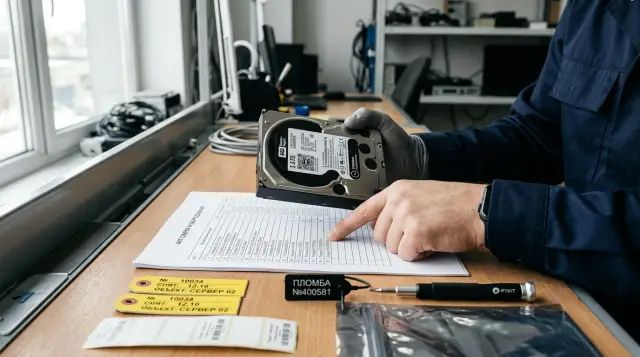
Writing off a computer does not prove that the data on its drive has been destroyed. An inspector needs a coherent chain: the organization had the authority to delete the information, selected a method for the media type and risk, performed the procedure, checked the result, and did not lose the media before sending it for recycling.
That is why the phrase "hard drive formatted" is almost useless in a record. It does not identify the drive, explain the sanitization technique, say anything about backups, or distinguish a successful operation from a command that ended with an error. A sound document set links a specific serial number to a specific result.
One write-off record is not enough
An equipment write-off record and a data destruction record confirm different events, so one document rarely replaces the other. The accounting commission decides the fate of a fixed asset, while information security staff confirm that protected information cannot be retrieved from the media using the method selected by the organization.
In practice, the package consists of four documents or logical blocks:
- A decision to take the equipment out of service, including its asset number, included components, and reason for write-off.
- Authority to delete the information: an expired retention period, an approved expert commission decision, a policy requirement, or another applicable basis.
- A media sanitization record or certificate containing serial numbers, the method, the tool, the verification result, and signatures.
- A transfer record for waste or equipment sent to a contractor, listing the same media and confirming the final operation.
You may combine these blocks in one document if internal procedures allow it and all details remain intact. However, a line in an accounting record that says "drive destroyed" proves neither the authority to delete the records nor the technical result.
Check archival duties separately. Kazakhstan's current Rules for the Acceptance, Storage, Accounting and Use of Documents of the National Archival Fund and Other Archival Documents first require an appraisal and a record selecting electronic documents for destruction. For organizations covered by this procedure, destruction is allowed after the required approvals and authorization by the head of the organization. The Rules also allow suitable media to be reused after the information has been erased, while unsuitable media must be written off and destroyed with a corresponding accounting entry.
This is an important distinction: removing data from a disk and lawfully destroying electronic records are different actions. If a contract's retention period has not expired, flawless drive sanitization can still create a violation. Before work begins, the information owner must confirm that required originals and mandatory copies have been preserved and that the copies in scope may be destroyed.
The normal retention period does not always provide the final answer. Litigation, an internal investigation, a regulator's request, or a deletion hold may temporarily stop scheduled destruction. The batch register should have a "deletion hold" field and a reference to the decision, and the commission must remove affected media before the procedure starts. An oral message from legal counsel can easily disappear between the warehouse and contractor.
Data and the media's destination determine the method
Choose the method according to data confidentiality, storage technology, media condition, and its next destination. The price of the equipment affects a reuse decision, but it does not lower information protection requirements.
NIST SP 800-88 Rev. 2 divides sanitization outcomes into Clear, Purge, and Destroy. Clear protects against simple recovery through the device's normal interface. Purge makes recovery with current laboratory techniques infeasible and may leave the media fit for use. Destroy makes such recovery infeasible and prevents the media from storing data again.
This model is useful in an internal standard even if a contract or industry requirement uses different terms. It forces the commission to define the required outcome before choosing a utility, degausser, or shredder. The common reverse approach, "we have this machine, so every drive goes into it," fails as soon as someone tries to degauss an SSD.
A practical decision sequence is:
- Determine the highest confidentiality level of information that could have been on the media, not merely what is visible now.
- Record whether the media will remain under organizational control, go to an employee, be returned under warranty, or reach an outside recycler.
- Determine the media type and condition from the model and manufacturer documentation.
- Select the acceptable Clear, Purge, or Destroy outcome under internal policy, the contract, and applicable rules.
- Assign the sanitization technique and verification method before the media leaves secure storage.
If the data classification is unknown, do not automatically treat the data as public. An old office computer may contain HR system exports, access keys, local email, and temporary files, even if its owner remembers only presentations. The commission should apply the category of the system in which the equipment operated or formally accept a stricter level.
Software sanitization does not suit every drive
Software sanitization is suitable for working media when an approved technique covers every storage area and provides a verifiable completion status. Quick formatting, deleting a partition, emptying the recycle bin, and resetting an account are not such techniques.
For a working magnetic HDD, one pass that writes a non-sensitive pattern across all addressable space will usually achieve a Clear outcome. Multiple passes remain in old instructions, but the number of passes does not repair incomplete coverage. It is far more useful to record the drive model, the range of addresses processed, utility version, completion code, and the result of reading a verification sample.
SSDs and other flash storage behave differently. The controller distributes writes across physical cells, keeps spare capacity, and moves data to balance wear. A normal write through the file system does not have to touch old pages. NIST expressly warns that overwriting the user-addressable space of an overprovisioned SSD can provide very little protection.
For a working SSD, choose the built-in Sanitize, Block Erase, or Cryptographic Erase command only after checking the model's documentation. A command name proves nothing: the manufacturer should describe which areas it covers, and the operator should preserve its completion status. Cryptographic erase quickly destroys the key used to encrypt user data, but it is convincing only when its conditions are met. The data must have been encrypted before it was written, every copy of the key must fall within the deletion scope, and no backed up or exported key may remain in another system.
For phones, tablets, printers, storage systems, and network equipment, a "factory reset" alone is also insufficient. First list all built-in and removable storage: internal drives, memory cards, job logs, address books, management modules, and controller caches. Then apply the manufacturer's procedure for the exact model and process removable media separately. If the manufacturer does not explain what the reset deletes, accept it only for low risk or supplement it with a stronger method.
On a server or storage system, inspect more than the drives visible to the operating system. Data may remain on a hot spare, in a controller cache with nonvolatile memory, on a boot module, on a service drive, or on a drive removed from an array. First map the installed components by slot and serial number, then compare the map with the array configuration. Deleting a logical volume does not sanitize physical drives, and rebuilding RAID does not prove that old blocks were destroyed.
The sanitization log must be clear to a person who did not run the utility. A minimum entry looks like this:
Носитель: SSD, модель ABC-960, серийный номер S4N001827
Метод: Purge
Техника: NVMe Sanitize, Block Erase
Инструмент: утвержденная утилита, версия 2.4.1
Начало: 2026-07-21 10:14
Окончание: 2026-07-21 10:22
Статус: completed successfully
Проверка: журнал Sanitize без ошибок, устройство исправно
Решение валидатора: принято
The wording and format depend on the tool, but the connection between serial number, operation, time, and decision must remain. A screenshot without a serial number is weaker than a text log that can be searched and matched to the register.
Degaussing works only on magnetic material
Degaussing applies to magnetic tapes and some HDDs when the equipment's field strength is suitable for the coercivity of the specific media. It does not erase data from an SSD, USB flash drive, memory card, or optical disc because these devices do not store bits in a magnetic layer.
The procedure needs care even with an HDD. A modern drive may stop being detected after exposure because its servo tracks are damaged, while the field remains too weak to sanitize the platters reliably. A nonworking drive is not proof of data destruction. NIST SP 800-88 Rev. 2 specifically says that the degausser must be matched to media coercivity and that some units can disable a device without achieving the required outcome.
The record should identify the degausser's manufacturer and model, its identifier, the date of inspection or calibration, accepted media types, cycle mode, and successful completion. Keep the equipment manual with the procedure or cite its details. The phrase "degaussed with industrial equipment" gives an inspector no way to assess whether the field was sufficient.
Do not call degaussing physical destruction. In the NIST model, it is a physical Purge technique, not Destroy. The media may be unusable afterward, but the required outcome depends on whether protected data is infeasible to recover, not on appearance or whether the drive can be connected.
For archival electronic records containing restricted information, Kazakhstan's rules name exposure to a magnetic field and mechanical destruction of the media. This is not permission to degauss every drive. The method still has to match the physics of the media, and the internal procedure must connect the regulatory basis to an exact technique.
Physical destruction needs a defined outcome
Choose physical destruction for failed media, highly confidential data, and cases in which a drive will leave organizational control without a reliable Purge technique. Breaking the enclosure, drilling one hole, or bending a circuit board is insufficient if a significant portion of the storage area remains intact.
For an HDD, destroy the magnetic platters across their entire surface to a fragment size allowed by the organization's approved standard. For SSDs, memory cards, and USB devices, the target is different: shred the memory chips themselves, not merely the plastic case and connector. On an optical disc, data sits in a layer of the disc, so cut or shred it until readable areas do not remain. Cut or shred magnetic tape to an approved particle size, or treat it with a suitable degausser when Purge is required.
NIST directly disputes the familiar one-hole practice: partial damage can leave areas that a laboratory can read. An internal standard should therefore define the result of processing, not merely name the action. State the maximum particle size or another measurable criterion for each media class, along with the equipment and visual inspection method.
Do not ask an employee to smash drives with a hammer. Fragments from glass platters, batteries, dust, and sharp parts create injury and fire hazards. Use purpose-built equipment, protective gear, and an area where the commission can keep the media under control. Remove a battery from a mobile device under the manufacturer's procedure before processing if the equipment is not designed for it.
After shredding, the commission should inspect the remnants and match them to the batch. For a small batch, a before and after photograph with visible tags helps, but a photograph supplements the register rather than replacing it. For a large batch, use a sealed container, loading sheet, seal number, weight or item count, operator report, and contractor acceptance record.
Each media type has a sensible choice
A method matrix should prohibit combinations that clearly do not work and leave operators only verified options. The basic scheme below can be tightened to meet a contract, sector rule, or data category.
- Inside the organization, a magnetic HDD can be fully overwritten for Clear or treated with its built-in Sanitize command for Purge. Before outside transfer, use verified Purge, suitable degaussing, or Destroy, and destroy a failed drive.
- For SSD and NVMe, use Sanitize, Block Erase, or Cryptographic Erase according to model documentation. Transfer them outside control after verified Purge or Destroy, and shred the memory chips if a device has failed.
- Reuse a USB drive or memory card only after a manufacturer technique with proven coverage. Destroy the memory chips when the data is sensitive or the media has failed.
- Treat magnetic tape with suitable degaussing for Purge or destroy it according to the data category. CD, DVD, and Blu-ray media are generally not reusable, so physically destroy their data layer.
- Process a phone, tablet, or MFP under the manufacturer's procedure together with every removable module. Outside transfer requires verified Purge or destruction of built-in memory, while a failed device should be disassembled and its memory destroyed.
The table does not replace checking the exact model. Two devices with the same connector can execute identically named commands differently. NIST moved specific techniques from the second revision of its guidance into IEEE 2883 precisely because drive characteristics change and the manufacturer should disclose how a command behaves on the device.
Returning a failed drive under warranty is particularly awkward. The organization loses physical control, while software sanitization may be impossible. Put the right to retain the media, receive a replacement without returning the drive, sanitize it under observation, or use an agreed supplier procedure with serial-number confirmation into the contract in advance. If the contract says nothing about this, the commission must accept the residual risk in writing or refuse the return.
Do not account for a removable server drive as an unnamed part. Link the drive's serial number to the server's asset number and slot, then continue tracking the drive separately. As a manufacturer and system integrator, GSE.kz can help a customer include media accounting, service procedures, and requirements for the future infrastructure while the supply is still being designed. The record itself remains the customer's document and must reflect its data classification and retention rules.
Checking the outcome matters more than a screenshot
A check should first confirm that the operation finished without an error, and then an authorized employee should decide whether the result is sufficient for the accepted risk. NIST calls these different actions verification and validation. Organizations often merge them and then mistakenly treat a "successful" log entry as proof that the method was appropriate.
Verification answers a technical question. For software sanitization, the operator checks tool status, errors, logs, and media health. For a degausser, the operator confirms cycle completion and equipment condition. For destruction, the commission inspects the remnants and compares them with the specified particle size or another criterion.
Validation answers a management question: was the technique suitable for this media and confidentiality level, did it cover the required areas, and can the residual risk be accepted? If an SSD successfully completes a degausser cycle, verification may confirm that the machine worked, but validation must reject the result because the method does not affect flash memory.
There is no need to read an entire drive after every correct procedure unless internal rules require it. NIST says elaborate content sampling after Clear or Purge is not necessary by default. Detecting abnormal statuses, inaccessible areas, the wrong technique, and an unverified equipment condition matters much more.
A practical batch control can work this way: the operator runs the procedure and signs the log, a second employee checks the serial number and result, and the process owner accepts or rejects the treatment. A rejected drive does not enter the shared container. Staff label it, return it to secure storage, and process it with a stronger method.
Show an inspector a register that opens the evidence for each row, not a pile of screenshots. Status fields should use a limited set of values: "successful," "error," "rejected by validator," and "escalated to Destroy." The free-form phrase "seems to have been erased" belongs in neither a log nor a record.
The record must link the decision to a serial number
A data destruction record is easier to accept when one row can reconstruct the full history of the media. The NIST Certificate of Sanitization form suggests recording the manufacturer, model, serial and property numbers, media source, confidentiality category, method, technique, tool and version, checks, responsible people, and next destination. A Kazakhstan organization should add the authority and internal decision details to this structure.
In the record heading, include the organization name, number, date, place, basis for the commission's work, order appointing its members, and the applicable version of the internal procedure. Then list commission members and their roles. A system administrator's signature without the information owner and accounting representative leaves two questions: who authorized deletion and who confirmed that the drive belonged to the asset?
The table should contain:
- the equipment asset number, type, manufacturer, model, and serial number of each storage device;
- the system or department where the media was used and the information category before processing;
- the deletion authority and decision on the media's next destination;
- the Clear, Purge, or Destroy method, exact technique, tool, version, and equipment identifier;
- the time, verification result, validation decision, and reference to a log file or appendix.
After the table, state the totals: how many storage devices were treated successfully, how many were rejected, how many went to reprocessing, and where the accepted batch was sent. State separately that accounting records were updated, the old classification label was removed only after acceptance, and the appendices form part of the record.
You can transfer this wording framework into an internal template:
Комиссия на основании приказа от [дата] № [номер] и решения
о выделении информации к уничтожению от [дата] № [номер]
провела санитарную обработку перечисленных носителей.

Для носителя [тип, модель, серийный номер, инвентарный номер]
выбран метод [Clear/Purge/Destroy], техника [точное наименование].
Операцию выполнил [ФИО, должность] инструментом [название, версия
или идентификатор оборудования] в [время, место].

Verification: [статус, ошибки, способ проверки].
Validation: результат [принят/отклонен], основание решения [ссылка
на пункт политики]. Дальнейшая судьба: [внутреннее использование,
передача подрядчику, переработка, уничтожение].
Do not write "recovery is impossible under any circumstances" in the record. That absolute claim cannot be tested. It is more accurate to say that the commission found recovery infeasible for the defined level of effort under the selected method and policy. This wording is also closer to the NIST definition.
The chain of custody ends at the recycler
The organization's responsibility does not end when a courier takes away a sealed container. Until confirmed processing, you need to know who accepted each storage device, where it was, and which event completed its disposition.
In the contractor agreement, specify acceptable methods and the required destruction result, processing location, deadline, prohibition on changing subcontractors without approval, transport requirements, incident notification, observation or audit rights, and the final evidence package. A standard waste handling licence does not by itself prove an ability to destroy data.
Transfer the media against a register with serial numbers or an identifier for a sealed batch that links unambiguously to a closed register. Record seal numbers, number of packages, sender, recipient, time, and signatures. If the contractor counts only the weight of electronic waste, the organization loses its link to individual drives before processing begins.
After the work, obtain a completion record and a destruction certificate or report bearing the same batch number, method, equipment, date, place, result, and responsible person. Reconcile the number of accepted items, exceptions, and remnants. Do not close a mismatch with a corrected figure and no investigation: a missing drive remains a data carrier even when its book value is zero.
Reconciliation must also explain an extra item. If a contractor returns a serial number that was not on the transfer sheet, the cause may be a scanning error, mixed batches, or somebody else's media in your container. Quarantine the exception, preserve seals and access logs, and assign an owner to investigate it. Sign the final record only after the starting count, processed items, returns, and exceptions reconcile arithmetically.
Backups require a separate decision. Destroying a workstation drive does not remove files from a server backup, cloud repository, email, or archive. The equipment record does not need to list every backup, but the deletion authority must define scope, copy expiration periods, and responsibility. Kazakhstan's documentation rules expressly connect destruction of an electronic record with the inability to restore it through the information system, on media, or from backups.
Retain the record, logs, photographs, transfer register, contractor evidence, and exception decisions for the period defined by the organization's file plan and policy. The evidence itself should not expire accidentally before the period in which an inspector or data subject may ask about the operation.
For the next batch, take one serial number from the write-off register and follow it through the documents to its final result. If the chain stops at the words "sent for recycling," the batch is not ready to leave your control.
Frequently asked questions
Can data destruction be included in the equipment write-off record?
Yes, if the form contains every technical detail and internal procedures allow the documents to be combined. In practice, a separate media appendix is easier to review because it exposes serial numbers, methods, logs, and error decisions.
Is formatting a drive enough before recycling?
No. Quick formatting usually changes file system metadata but does not prove that every storage area was processed. Use an approved full overwrite or built-in sanitization command for an HDD, and the manufacturer's procedure or physical destruction for an SSD.
How many overwrite passes does an HDD need?
The approved technique should define the pass count, not an administrator's habit. For a Clear outcome, full coverage of addressable space, a successful status, and verification matter more than mechanically repeating seven or thirty-five passes.
Can an SSD be sanitized by overwriting it with zeros?
Do not treat that overwrite as a reliable Purge because the SSD controller hides spare cells and moves data. Use a supported Sanitize, Block Erase, or Cryptographic Erase command with a verifiable status, or destroy the memory chips if there is doubt.
Does degaussing work for SSDs and flash drives?
No. Degaussing affects a magnetic layer, which SSDs, USB drives, and memory cards do not have. A completed degausser cycle in this case proves that the machine ran, not that it destroyed any data.
Must a working drive be physically destroyed?
Not always. If a verified Purge technique matches the data and the media can be reused under control, physical destruction only creates unnecessary waste. Destruction is often the only convincing option for a failed drive or an unverified command.
What should we do with a failed drive under warranty?
Do not return it automatically if sanitization is impossible. Exercise a contractual right to keep the media, arrange processing under observation, or obtain supplier evidence tied to the serial number; otherwise the risk owner must decide in writing whether return is acceptable.
Whose signatures belong on a data destruction record?
Include the roles that authorize deletion, confirm media ownership, perform the procedure, and accept the result. Each organization defines the exact membership, but the operator's signature alone does not cover the information owner's decision or accounting for the physical asset.
Are photographs of destroyed drives mandatory?
Photographs help, but they do not replace a register and an equipment report. The image should connect the batch or tags before processing with the result afterward, since a photograph of an anonymous pile of fragments proves nothing about a particular serial number.
How do we assess a media destruction contractor?
Review its equipment, measurable processing result, transport, seal accounting, subcontractors, and final certificate format. Run a test batch and follow one serial number from transfer to the report before handing over a large volume.
