8 min read
How do you deploy BitLocker with TPM at scale?
A mass BitLocker deployment across 300 PCs: TPM checks, recovery key escrow, rollout waves, and recovery after motherboard replacement.
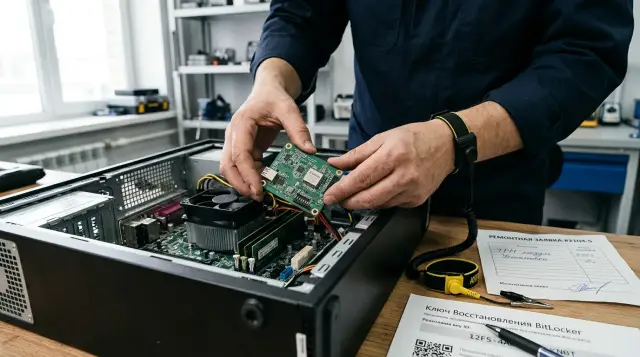
A mass BitLocker rollout across 300 workstations must begin with proof that the organization can unlock every drive without its original motherboard, not with an encryption command. If the recovery key for even one encrypted computer exists only on that computer, the project has created a new risk instead of removing an old one.
TPM removes the daily key-handling burden from the user. It also binds normal startup to the expected state of the platform. A motherboard replacement, TPM reset, boot-chain change, or bad firmware setting can send the computer to the recovery screen. That is a normal protective response, but only if support can quickly find the correct 48-digit password, verify the employee's identity, record the disclosure, and return protection to a healthy state after sign-in.
For a fleet of 300 PCs, the work has four independent outcomes: compatible hardware, one policy, confirmed key storage, and rehearsed recovery. The percentage of encrypted drives shows only the first layer. Readiness starts when each device's inventory record, key identifier, directory object, and repair procedure all agree.
Start with recovery, not encryption
The recovery key must reach managed storage before policy allows BitLocker activation to finish. Microsoft's BitLocker recovery overview says this directly: store keys for Microsoft Entra joined devices in Microsoft Entra ID, and store keys for Active Directory domain computers in AD DS. Microsoft also recommends the policy that prevents BitLocker activation until recovery information has been saved to the directory.
That setting matters more than a polished coverage report. Encryption without escrow, meaning the secret was never sent to central storage, can look healthy for months. The failure appears during repair, after the old TPM is no longer available. The employee sees a key identifier on the recovery screen, while the administrator finds an empty computer object, an obsolete key, or a record from another Windows installation.
Answer five questions in writing before the pilot:
- Where is the 48-digit password for each system volume stored: AD DS, Microsoft Entra ID, or the Configuration Manager recovery service?
- Who may read it, and how is that right separated from ordinary workstation administration?
- Which attributes let an operator connect the recovery screen to a record: key identifier, serial number, device name, and assigned user?
- Where is each view or disclosure of the secret logged?
- What happens after the password is used: automatic rotation, a remote action, or manual protector replacement?
A file on a network share and a printed copy are technically supported, but they are a weak foundation for 300 workstations. Files are easy to copy, printouts become stale after rotation, and incident-time retrieval depends on someone else's folder discipline. A central directory connects the secret to the device object and supports controlled access. An offline export may supplement that design, but it must not turn into a broadly accessible spreadsheet full of keys.
Access to a recovery password grants access to the data on the drive. Give it to a dedicated support group, audit each view, and do not grant Domain Admin just to expose one tab in a console. Microsoft documents the BitLocker Recovery Password Viewer in RSAT: an operator can search AD DS using the first eight characters of the identifier displayed on the recovery screen. This is a practical workflow when rights are narrowly delegated and computer objects are retained until repair and disposal are complete.
Inventory separates ready PCs from future incidents
Before assigning policy, group the fleet by its actual condition because identical models in a procurement register do not guarantee identical firmware, disk layout, or WinRE state. For every one of the 300 devices, collect at least its name, serial number, Windows version and edition, UEFI mode, Secure Boot state, TPM version and readiness, WinRE state, partition style, system-partition free space, current encryption product, and BitLocker state.
Collect the data with management tools that the organization already permits. A basic local check looks like this:
Get-Tpm
Confirm-SecureBootUEFI
Get-BitLockerVolume -MountPoint $env:SystemDrive
reagentc.exe /info
manage-bde.exe -status C:
For Get-Tpm, inspect TpmPresent, TpmReady, TpmEnabled, and TpmActivated. For Get-BitLockerVolume, check VolumeStatus, ProtectionStatus, EncryptionMethod, and the KeyProtector types. The manage-bde -status command reports volume size, encryption percentage, method, protection state, and lock state. Do not reduce these answers to a single ready flag. Record the reason for every exclusion, or support will repeatedly investigate the same fault.
TPM 2.0, UEFI, and Secure Boot provide a predictable modern baseline, but TPM presence alone proves nothing. Firmware may disable the module, it may not be ready, a repair may have cleared it, or attestation may be failing. WinRE is also required for some automatic and silent scenarios. Microsoft Troubleshooting BitLocker policies from the client side lists a missing TPM, disabled WinRE, and the wrong UEFI mode among common causes of failure. Checking reagentc /info before deployment costs less than analyzing a hundred identical errors after policy assignment.
Identify devices that already have Device Encryption or manually configured BitLocker. They may use another algorithm or protector, store a key in a personal Microsoft account, or have no corporate backup at all. Do not decrypt them automatically for consistency. First escrow the existing password in the chosen directory, confirm its identifier, and only then bring the protectors into policy.
Check the Windows edition and license terms for the chosen centralized management method. Do not promise silent activation where the edition, join type, or policy requires user action. For Intune, Microsoft lists Microsoft Entra join or hybrid join, a compatible TPM, UEFI, Secure Boot, and available WinRE among the conditions for silent activation. A policy that requires a startup PIN conflicts with a fully silent setup because someone must create the PIN.
The inventory should produce four queues: ready devices, devices repairable in software, devices that need firmware configuration, and devices that need hardware repair or replacement. A fifth queue holds exceptions with another encryption product. Until every exception has an owner and a due date, the number 300 in the plan is only an aspiration.
The pilot must break scenarios before broad assignment
A pilot is not a demonstration that encryption succeeds on five new laptops. It must deliberately test the events that will later wake support staff. Choose 20 to 30 devices across hardware batches, departments, and connection methods. Include a machine with a slow disk, one that carries an old partition layout through several upgrades, a remote workstation, a PC with manually configured BitLocker, and a computer that recently underwent repair.
Count the pilot as successful only after a controlled recovery. On a test device, retrieve the password identifier, find the corresponding directory record, invoke the recovery screen through an agreed safe method, enter the password, and boot Windows. Then check the event, protection state, and key rotation. If the team is afraid to run that test during the pilot, it is not ready to perform it on an executive's workstation after motherboard replacement.
Also test a UEFI update, a boot-order change, enabling and disabling Secure Boot in the lab, clearing the TPM on a dedicated test machine, and starting the recovery environment. Users should not be allowed to perform all these actions. The point is to see the actual messages, events, and ticket handling time. Put screenshots and exact field names in the internal procedure, but never paste the 48-digit password into it.
A good pilot produces an acceptance table, not a story that it worked. Record the following for each device:
- The device received policy without conflict, and the selected encryption method matches the project.
- The system volume is fully encrypted or actively encrypting, protection is on, and a TPM protector is present.
- A recovery password exists on the volume and in central storage, and the identifiers match.
- An authorized operator can find the record by identifier and leaves an auditable trail.
- After the recovery test, the old password is rotated or marked for immediate rotation.
Measure encryption speed on your own disks under your own workloads. Do not copy someone else's timing from a presentation into the change plan. Used Space Only encryption usually shortens the initial phase for new media that has never held data. Microsoft warns in the BitLocker operations guide that deleted files occupy free space and may remain recoverable when the disk previously contained unencrypted confidential data. Use full encryption on active PCs when media history is unknown or the drive has already held business data.
Expand the pilot only after fixing repeated causes. An error on one device may be local. The same error on three models running one UEFI version calls for a baseline correction, not another attempt to assign policy.
Policy must rule out unsafe states
A single policy must describe the encryption algorithm, allowed protectors, mandatory key escrow, recovery behavior, and rules for removable and fixed volumes. The most dangerous configuration looks tidy in the console: BitLocker is on and a TPM protector exists, but successful escrow is not required. That device cannot pass acceptance.
For a Windows 10 and Windows 11 fleet, XTS-AES is the usual choice for internal volumes. Agree on 128 or 256 bits according to the threat model, regulatory requirements, and hardware performance. A policy change does not replace the algorithm on an already encrypted volume. BitLocker applies the new method only after decryption and re-encryption. Mass decryption of healthy workstations merely to standardize a number makes little sense without a binding requirement, because data remains unprotected during the transition and drives take extra load.
TPM-only and TPM+PIN address different threats. TPM-only supports unattended startup and often fits managed desktop workstations when Windows uses strong authentication, Secure Boot is enabled, and physical access is controlled. A startup PIN adds a factor before Windows loads and may suit mobile devices or higher-risk settings, but it increases support demand and prevents completely unattended activation. Do not impose a PIN on all 300 PCs simply because two factors sound stronger. Define the threat it addresses, the PIN reset process, and how it works for computers with no keyboard on site.
In AD DS, enable operating-system-drive recovery settings, recovery password storage, and the requirement that BitLocker cannot activate until backup to the directory succeeds. Verify that the directory schema supports BitLocker attributes, replication works, and the computer account can write the recovery child object. For Microsoft Entra ID and Intune, require recovery information to be stored before activation and inspect the Encryption report. No BitLocker key found for this device is a failed acceptance result even when the client reports 100% encryption.
Agree on who may suspend protection. Suspension does not decrypt the drive, but it temporarily exposes the key through a clear key so a planned platform change does not trigger recovery. It is a maintenance tool for firmware updates and repairs, not a universal way to suppress an error. The command manage-bde -off C: begins decryption and removes protectors when it finishes. Microsoft explicitly advises against using decryption as a troubleshooting step.
Policy must also cover the object lifecycle. A Windows reinstall creates a new password, so the directory may contain several records. If a computer was renamed or reused, the operator needs its serial number and current identifier rather than a guess based on its name. Before deleting an object during decommissioning, confirm that data has been transferred, the disk has been sanitized under procedure, and no repair will need the old key.
Roll out in rings and stop on signals
Split 300 workstations into controlled waves, for example 25, 50, 100, and 125 devices. Adjust the sizes for geography and support capacity. Leave a full business cycle between waves so you can observe overnight restarts, updates, user tickets, and key-replication delays. Assigning policy to the entire fleet at once hides a shared cause behind a queue of individual incidents.
Before each wave, freeze the device list and observation window. Do not encrypt a branch office with a slow link, cash-register or clinical workstations, executive machines, and the support team's devices on the same night. Support should first complete the process on its own PCs and learn the difference between an encryption process and enabled protection.
After policy arrives, use a reproducible command set for local verification:
$volume = Get-BitLockerVolume -MountPoint $env:SystemDrive
$volume | Select-Object MountPoint,VolumeStatus,ProtectionStatus,EncryptionPercentage,EncryptionMethod
$volume.KeyProtector | Select-Object KeyProtectorType,KeyProtectorId
The expected result shape contains one row for volume C: with FullyEncrypted after completion, a ProtectionStatus value of On, the selected method, and two logically distinct protectors: TPM for ordinary startup and RecoveryPassword for emergency access. During processing, EncryptionInProgress and a percentage below 100 are acceptable. FullyEncrypted with protection Off is not success. The disk is encrypted, but its protectors are suspended.
If the recovery password exists but has not reached the directory, fix escrow first. For AD DS, use:
$kp = (Get-BitLockerVolume -MountPoint $env:SystemDrive).KeyProtector |
  Where-Object KeyProtectorType -eq 'RecoveryPassword'
Backup-BitLockerKeyProtector -MountPoint $env:SystemDrive -KeyProtectorId $kp.KeyProtectorId
For Microsoft Entra ID, use BackupToAAD-BitLockerKeyProtector with the same identifier. The BitLocker operations guide also documents manage-bde -protectors -adbackup C: -id {ID}. A successful command does not prove that an operator can see the record. Verify it from the directory and compare the protector GUID.
Define automatic pause conditions for the wave. I stop assignment when normal restarts repeatedly trigger recovery, keys remain absent from central storage beyond the agreed replication interval, policy conflicts increase, or support cannot close tickets within its internal target. Each organization chooses its exact threshold, but it must exist before launch. Otherwise, the team will call every new failure an exception and keep deploying.
Tell users that encryption runs in the background, the computer should remain connected to power, and it must not go to repair without a ticket. Do not ask employees to save a key on a flash drive or photograph the screen. A corporate process cannot depend on a user's private archive.
Verify the device and key as a pair
Combine the encryption report with a recovery report. For each device, keep the volume state, protection state, protector types, current recovery password identifier, time of last successful escrow, record location, and result of a test lookup. Only this pair answers whether data can be recovered after TPM failure.
The identifier matters more than the computer name. On the recovery screen, Windows displays a Key ID that tells the operator which password to select from several records. An AD DS computer object may contain several recovery child objects after password changes or reinstallation, and that is normal. Microsoft Entra ID may also retain key history. Giving out the newest key without matching the identifier often fails and needlessly exposes another secret.
Use automated reconciliation where the management system permits it, and perform a manual sample after every wave. A client-side check confirms that a protector exists, but it does not test operator permissions or directory availability. A manual check of ten random devices catches bad delegation, replication delays, naming errors, and instructions that only their author understands.
If the key is missing from the directory while Windows still starts, the repair window remains open. Create or identify the active recovery protector, send it to storage, verify the record from the support side, and only then permit repair or TPM changes. Never clear the TPM or replace the board on the assumption that the key must have been saved somewhere.
After anyone views the 48-digit password, treat it as exposed. Microsoft supports automatic recovery password rotation for Microsoft Entra joined and hybrid joined devices when policy enables it, and Intune can start rotation remotely. For AD DS, use a controlled sequence: add a new recovery password, save it successfully, confirm the record, and only then remove the old protector. The order matters because removing the old key before confirming the new one recreates a recovery gap.
Keep access logs separate from keys as far as the chosen platform allows. A ticket needs the identifier, reason, device, operator, and verification result. Do not copy the full password into the ticket system, chat, or email. That may simplify today's search, but it leaves persistent, uncontrolled copies of the secret.
Support must recover access from a runbook
An operator should disclose a key only after verifying the device, user, and reason for recovery. The BitLocker screen alone does not prove that the caller owns the computer. For a remote employee, use the approved identity procedure and match the serial or asset number, assigned user, and Key ID. If the situation suggests tampering, loss, or theft, do not dictate the password until the security team decides.
A working recovery card fits on one page:
- Record the first eight characters of the Key ID and the asset number, without copying the full recovery password into the ticket.
- Verify the caller's identity and right to access the device.
- Find the exact matching identifier in AD DS, Microsoft Entra ID, or the recovery service.
- Send the password through the approved channel, wait for Windows to start, and identify the recovery cause.
- Restore protection, rotate the used password, and close the ticket with the verification result.
After sign-in, run manage-bde -status C: and inspect Microsoft-Windows-BitLocker/BitLocker-API. Ask what happened before the failure: Was firmware updated? Did the boot order change? Was another drive attached? Was the TPM cleared? Was the computer repaired? Microsoft BitLocker recovery process recommends identifying the cause and then refreshing platform validation. A suspend and resume pair resets the validation profile for a legitimate new state, but first rule out malicious modification.
Use these commands for a controlled binding refresh:
Suspend-BitLocker -MountPoint C: -RebootCount 1
Resume-BitLocker -MountPoint C:
Get-BitLockerVolume -MountPoint C:
Do not run them automatically on a suspicious device. If the user did not request a firmware update, the case was opened, or the boot configuration changed without explanation, send the machine to security specialists. Recovery means the platform measurements no longer match. Sometimes repair explains it, and sometimes it is the only early warning of tampering.
If the password does not unlock the volume, match the Key ID again first. Then check numeric input and transcription. repair-bde.exe exists for damaged volumes that normal methods cannot unlock, but it does not replace a backup. Block-level recovery may require a recovery password or recovery key and a separate target drive whose contents will be overwritten. Do not experiment with that command on the only copy of important data.
Replace a motherboard only with a verified key
A planned motherboard replacement begins with verification of the data backup and recovery password. It ends with protection enabled again and a test restart. The old TPM is physically on or tied to the previous board, so ordinary TPM unlocking cannot be assumed after the repair.
Before shutdown, find the current recovery protector identifier on the client and the corresponding password in central storage. Ask a second support operator to perform the reverse lookup exactly as during an emergency. Verify a current backup of user data. BitLocker prevents someone from reading a lost drive, but it cannot save a file from SSD failure, a repair error, or accidental deletion.
Then suspend protection for a limited number of restarts:
manage-bde.exe -protectors -disable C: -RebootCount 2
manage-bde.exe -status C:
Choose the restart count to match the actual repair process. Too small a number causes recovery during diagnosis; too large a number extends the time with suspended protection. Record the time, technician, and device. Do not leave a computer with a clear key outside physical control.
After installing the board, configure UEFI in the agreed mode, enable Secure Boot, and prepare the TPM. Do not clear the new TPM again without a reason. Windows may request the recovery password on first start, especially if the restart count expired or boot measurements changed. Enter the password whose Key ID matches. Microsoft notes that BitLocker can bind to a new TPM after an operating-system volume is opened with a recovery protector; suspend and resume update validation after a legitimate platform change.
Once Windows starts, run Resume-BitLocker if protection remains suspended. Confirm that ProtectionStatus is On, the TPM protector exists, the recovery protector exists, and its copy is accessible in the directory. Perform a test restart without entering the recovery password. If the password was used, rotate it and confirm the new identifier in storage.
An emergency replacement differs only because the old system cannot be prepared. Do not repeatedly boot the rebuilt computer and guess. Install the drive, read the Key ID on screen, find the exact match, unlock the volume, and then update the protectors. If the key is missing, restoring the old board or TPM may be the only path to ordinary unlocking. Neither the computer manufacturer nor Microsoft can derive a lost recovery password from a serial number. That is why escrow verification must happen before encryption.
For a fleet procured and supported as one project, connect BitLocker requirements to the hardware record, firmware versions, and repair procedure. GSE.kz manufactures computers in Kazakhstan and provides system integration, so a project can align hardware, software policy, delivery, and ongoing support as one lifecycle without changing the key-storage model described here.
Operations continue after the report reaches 100 percent
Deployment completion marks the start of continuous control, not the end of the subject. Every month, find devices with protection Off, a missing recovery protector, a key without confirmed escrow, stale policy, repeated recovery events, or a long absence from management. Monitor new and reinstalled PCs separately because they may enter the fleet after the final project report.
Do not rely on one encrypted metric. A minimum operational set includes the share of devices with protection on, the share with a confirmed key, the number and causes of recovery requests, key lookup time, used passwords that have not been rotated, and exceptions with owners. These measures show process quality. One hundred percent encrypted volumes with ten unknown keys still means ten possible data-loss events.
Integrate BitLocker into firmware changes. An update package must either interact with protection correctly or invoke an approved suspension for the necessary number of restarts and reliably resume it. Check state after the campaign instead of trusting the installer's return code. Users do not notice a difference during startup, so a forgotten suspension can survive until the next audit.
Integrate it into employee lifecycle processes too. Before handing a PC to another employee, preserve required data, sanitize the device under the approved procedure, and create a new managed installation. Before disposal, remove data as organizational policy requires. Deleting the directory key does not erase the drive. Before deleting the device object, confirm that repair, investigation, and hardware return are complete.
Once a quarter, run a recovery drill on a random device from every hardware group. An operator who has not seen the recovery screen for six months will read the long procedure at the worst possible time. The drill tests people, permissions, directory access, logging, and rotation rather than cryptography. Those connections are the parts that most often fail silently.
A reasonable completion criterion for 300 workstations is strict: every drive follows policy, every active recovery protector can be found by its ID outside the device, support has completed a recovery at least once, and the repair team never changes a board without verifying the key. If any condition is missing, the project is still running even when the console shows a green 100 percent.
Frequently asked questions
Can I enable BitLocker on all 300 computers at once?
You can technically do it, but it is a poor management decision. Divide the fleet into waves and advance only after checking encryption, key availability, support load, and a controlled recovery.
Is TPM without a PIN enough for an office computer?
TPM-only often gives a sensible balance for a managed desktop when Secure Boot, strong Windows sign-in, and physical controls are in place. Consider TPM+PIN for mobile or higher-risk devices, while accepting the extra burden on users and support.
Where should BitLocker recovery keys be stored?
Store them in AD DS for domain computers, in Microsoft Entra ID for Microsoft Entra joined devices, or in an approved enterprise recovery service. Storage must be separate from the protected PC, restrict read access, and audit access.
Is a computer protected when its status is FullyEncrypted?
No. Check `ProtectionStatus`, the TPM protector and recovery password, then confirm that support can see the same key identifier in central storage.
Should I fully encrypt a drive that is already in use?
If the drive previously held business data, choose full encryption unless policy provides another justified option. Used Space Only does not process free space, which may still contain fragments of previously deleted unencrypted files.
What if BitLocker is active but the directory has no key?
While Windows still starts, escrow the active recovery protector in the chosen storage and verify it from the support side. Do not clear the TPM, change boot configuration, or send the computer for motherboard replacement until confirmation.
Must I decrypt the drive before replacing the motherboard?
Usually not. Verify the key and data backup, suspend protection for a limited number of restarts, complete the repair, then resume protection and test startup.
Why did a UEFI update trigger the recovery screen?
The boot-platform measurements used by TPM changed. If the update was planned, enter the matching recovery password, verify the cause, and refresh the binding through a controlled suspend and resume.
Should the recovery password change after use?
Yes, treat a used password as exposed. Enable automatic rotation where supported, or create a new protector, confirm its escrow, and only then remove the old one.
Will BitLocker save data when an SSD fails?
No, BitLocker protects the confidentiality of data on lost or stolen media, not its availability. Backup and recovery testing remain separate responsibilities.
