8 min read
Auditing a Computer Equipment Manufacturer Before Signing a Contract
Audit of a computer equipment manufacturer: a factory inspection route, component control, testing, spare-parts warehouse, service, and contract documents.
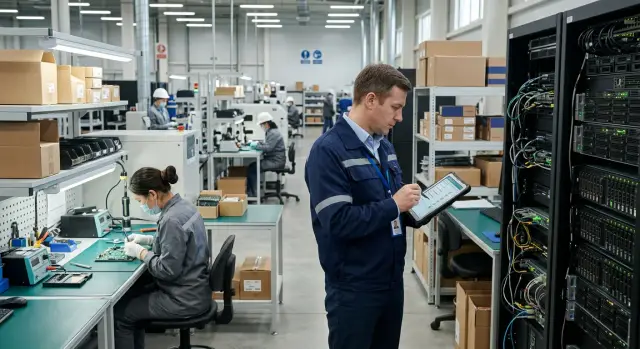
What to check before signing a contract
A long-term contract for computers, servers, or workstations ties the customer to a manufacturer for years. A poor choice will show its consequences beyond the first delivery. It can cause delays, inconsistent configurations within one batch, shortages of repair parts, and employee downtime.
An audit of a computer equipment manufacturer checks the company’s actual ability to produce and support equipment in the required volume, not its presentation. One device sample or a price list is not enough. You need documents, a site inspection, and precise answers from the people responsible for production, quality, and service.
The inspection should cover four areas: production, quality, supply, and service. Establish where the equipment is assembled, how serial numbers and components are tracked, which tests each finished device passes, and how the company handles defects. It is also important to understand where parts come from, how the supplier responds to shortages, and whether spare parts and engineers are available for warranty repairs.
A supplier’s statements do not provide enough protection. If a company claims to manufacture products itself, the customer should see the assembly areas, the product route, and production records. If it promises fast repairs across the country, ask for service-location addresses, stock information, and the rules for responding to a request.
For example, an organization is purchasing 800 workstations with three years of support. The manufacturer may assemble the first batch on time and then change its SSD or memory supplier. Without an agreed procedure, that replacement can create different equipment specifications and sometimes compatibility problems. An inspection of computer production should show who approves a replacement, how the new part is tested, and how the customer is notified.
During a visit to the Kazakh manufacturer GSE, it makes sense to inspect the entire product journey: design, production at sites in Kazakhstan, delivery, and the service network. Separately request confirmation of domestic manufacturer status, applicable ISO certificates, and warranty-service documents. This information is particularly important for procurements with local-content requirements.
The purpose of the audit is simple: to make sure the future contract is based on working processes rather than promises in a commercial proposal.
How to prepare for the audit and request documents
Start the audit not at the factory entrance, but with a list of commitments under the future contract. Record the equipment models, quantities for each model, delivery schedule, and recipient addresses. List separately the regions where the customer expects warranty repairs and parts replacement.
This list helps you check the capabilities that actually matter. A manufacturer may assemble office PCs confidently, while the contract includes servers for several regions. In that case, auditors should see the server assembly area, testing procedures, critical-parts stock, and rules for dispatching service engineers.
Agree on the scope of the visit
Agree on the date in advance and ask the manufacturer to confirm the route in writing. The group usually includes a procurement employee, an IT specialist, and a person responsible for operations or service. For a large contract, involve a quality specialist.
List the areas that auditors must visit in the request: component receiving, the warehouse, assembly, testing, the spare-parts warehouse, and the service center. The manufacturer may restrict access to some areas for safety reasons. In that case, it should offer another way to verify the process: documents, system records, or an inspection without photography.
Before the visit, ask the manufacturer to appoint responsible employees for each stage. A conversation with the production manager, quality controller, and service manager provides more facts than a general presentation.
Request documents before you arrive
Request documents for a defined period, such as the last 6-12 months. This lets you see the normal operating procedure rather than a specially prepared batch.
- registration documents and confirmation of manufacturer status;
- quality-management system certificates and documents for the stated models;
- production plans, capacity information, and examples of product passports or serial numbers;
- incoming component inspection logs, test reports, and defect reports;
- a list of service centers, spare-parts balances, and warranty-replacement rules.
For GSE.kz, it is appropriate to request confirmation of production in Kazakhstan, documents for the L200, M200, or S200 series if they are included in the procurement, and information about the service network in the required cities. Advertising materials do not replace these documents.
Prepare a working table in advance with four columns: contract requirement, fact observed on site, supporting document, and auditor’s comment. Add the statuses «confirmed», «partially confirmed», and «not confirmed». After the visit, the table will show which terms can be included in the contract and where additional guarantees are needed.
The site route on the day of the visit
Start the day with a short meeting with the production manager and the person responsible for quality. Confirm the visit program, participants, contract models, and the areas you will see. Ask about the active shifts, monthly output, and visitor-access rules for production areas.
Do not limit the inspection to a showroom with finished computers. An audit produces results when the inspector follows the same route as the product, from component delivery to shipment to the customer.
Record facts immediately. For each area, note the date, time, name of the responsible employee, batch number, and serial numbers of several randomly selected devices. Take photographs only in accordance with the company’s rules.
Inspection sequence
Start in the receiving area. Check how employees compare deliveries with the shipping note, inspect packaging, and separate parts that have not passed inspection. Then move to the component warehouse and see how usable, reserved, and rejected items are separated.
Next, walk along the assembly line. Choose one computer or server and ask to see its route in the accounting system: which components were installed, who performed the operation, and when the device was sent for testing. At GSE, you can compare the data for the chassis, processor, memory, and storage drive with the serial number of the finished machine.
After assembly, visit the testing area, finished-goods warehouse, and packaging zone. Clarify who authorizes shipment and how employees block devices with unresolved issues. Finish the tour in the spare-parts warehouse and service department if they are located at the same site.
During the route, check the connection between the component-batch number in the documents and on the physical packaging, the device serial number on the chassis and in the production record, and the assembly and testing dates. Compare the defect record with the decision made and the shipping order with the list of items inside the box.
If an employee cannot quickly find a record or the numbers do not match, record the discrepancy without arguing. Discuss such cases with the responsible people at the end of the day, request copies of the documents, and set a deadline for a written explanation.
Incoming component inspection
Incoming inspection shows whether a manufacturer can maintain quality before assembly begins. Check not only processors, boards, drives, and power supplies, but also the procedure itself: who accepts a batch, under which rules it is inspected, and where questionable goods are sent.
Start in the receiving area. It should be separate from assembly and protected from dust and moisture. Sensitive electronic components require anti-static measures: grounded tables, ESD packaging, and clear labeling. Boxes should not be placed on the floor, near heating appliances, or in passageways.
Compare several boxes from the current delivery with the shipping note and specification. Check the name, quantity, serial numbers, delivery date, and batch marking. If the specification requires a particular memory capacity or SSD model, the employee should show how compliance is confirmed.
Request documents for both normal and problematic deliveries:
- incoming inspection logs with the date, batch number, inspection result, and responsible employee’s signature;
- shipping notes, certificates, or component passports if required by the contract;
- nonconformity reports describing the defect, quantity, and batch number;
- decisions on rejected goods: return to the supplier, sorting, reinspection, or write-off;
- records of measuring-equipment checks if employees test component parameters.
It is especially useful to trace one entire batch. Take the number from the box, find it in the receiving log, confirm its storage location, and check how the system links that batch to assembled computers. This will show whether the manufacturer can quickly identify affected devices if the supplier later reports a defect.
Do not rely on documents without a real comparison. A neat log proves nothing if the shelves contain boxes with unsuitable labels or mixed batches. For a long-term contract, specify the deadline for notifying the customer about nonconforming components and the replacement procedure.
Assembly and product traceability
Do not limit the inspection to finished devices. Ask to follow one specific computer or server through the entire chain, from issuing components from the warehouse to packaging. This route shows whether actual work matches internal procedures.
Start with the production order. It should state the model, configuration, order number, and component list. Then check how the employee confirms installation of the processor, memory, drives, and power supply, application of the serial number, and final inspection.
Every workstation should have current instructions. They should specify the assembly sequence, protection against static electricity, permitted tools, and acceptance criteria. Ask to see the instruction version number and the replacement procedure. A printout without a date and document owner is not suitable for a long-term contract.
Using the serial number of a finished product, the manufacturer should be able to find the assembly date and shift, serial numbers of tracked parts, inspection results, operator ID, component batch number, and supplier. If the device was returned under warranty, the history should also contain repair information.
Test this in practice. Choose one computer in the finished-goods warehouse and ask to see its electronic or paper history. Then take the serial number of one component and ask which products contain it. Searching in both directions helps assess the possible scale of a batch recall.
Request process maps, operation lists, and employee-training records. A process map should show the sequence of actions and control points. In the records, look for the training date, program, employee, and skills assessment. If servers are assembled in the area, make sure personnel understand the rules for installing heavy components, mounting them in a rack, and checking cables.
GSE produces computers, all-in-one systems, and servers, so request separate records for each series. Desktop PC and rack-server assembly require different operations, and one general instruction often hides gaps.
Testing finished equipment
Test a finished device before packaging, when it can still be quickly returned to the assembly area. A «tested» label is not enough. The customer needs a list of tests, testing conditions, and records for each serial number.
The test set differs for a desktop PC, all-in-one computer, and server, but the principle is the same: the equipment must start, identify its components correctly, withstand a load, and transmit data through the intended interfaces. Ask to see a real test of one unit from the current batch, not a demonstration.
What the inspection should include
Before packaging, employees usually check system startup and loading, memory and storage, network ports, USB connectors, audio, and video. For an all-in-one computer, also test the touchscreen, camera, and microphone. For servers, check the drives, power supplies, remote management, and operation under load.
Ask how long the load test lasts and what criteria determine whether a device passes. The phrase «test passed» without the duration, software version, and result is almost useless. A server report, for example, should contain the serial number, date, employee name, configuration, and any errors recorded by the program.
Selectively review documents for several devices:
- a functional-test report with the serial number;
- a log of repeated checks after repair;
- instructions listing the required tests;
- records of calibration or inspection of measuring equipment;
- BIOS, firmware, and test-software version data.
How defects are handled
See where employees keep devices that have failed testing. This area should be physically separated from approved products and clearly marked with the product number, reason for failure, date, and responsible employee. If a faulty computer lies next to finished boxes, it could be shipped by mistake.
Clarify what happens to a device after a failure. The employee should record the fault, send the equipment for repair, and conduct a complete or specified repeat test. A part cannot simply be replaced and the computer returned to the production flow without a record.
Compare three things: the device on the table, its test mark, and the record in the accounting system. A mismatch in serial numbers or a missing repeat-test report requires an explanation before the contract is signed.
Spare-parts warehouse and replacement of components
The spare-parts warehouse shows whether the manufacturer can quickly return equipment to service after a failure. Service promises are not enough. The auditor must compare actual stock with the inventory system and understand which parts are available for common repairs.
Conduct a sample reconciliation. Choose frequently replaced items: power supplies, SSDs or HDDs, memory modules, fans, motherboards, cables, and adapters. The warehouse employee should show each item, its marking, quantity, and storage location. Then compare the data with an inventory-system export dated on the visit day.
Discrepancies do not always indicate a problem, but the manufacturer must explain them with documents: a parts-issue note for a repair, a write-off report, a receiving note, or an order in transit. It is useful to check not only the total balance but also stock already reserved for active contracts.
Storage and inventory control
Drives, boards, and memory modules need protection from dust, moisture, and static electricity. Check the packaging, batch labels, and separate storage of working, returned, and faulty parts. Cables and power supplies should not be stored with rejected items or without identification.
Request a spare-parts list with part numbers, compatible models, and minimum stock levels, an inventory-system export, a log of parts issued for repair and returned to the warehouse, and the replenishment history for recent months. Also review write-off, repair, and supplier-return reports.
Pay attention to replenishment times. If the warehouse has no motherboard for a supplied model, ask who orders it, how many days delivery takes, and whether an approved replacement component exists. The phrase «we will supply it when necessary» is too vague for a long-term contract.
Checking a replacement in practice
Ask to see one completed repair case. Using the device serial number, trace the chain: customer request, diagnosis, parts issue, installation, post-repair test, and request closure. This check connects the warehouse, service network, and equipment records into one process.
For example, a regional school had a faulty power supply replaced. The documents should match the computer model, serial number, part number of the installed component, warehouse-issue date, and test result after replacement. If records exist only in employee correspondence, it will be difficult for the customer to control deadlines and warranty obligations.
GSE states that it provides round-the-clock technical support and a service network across Kazakhstan. During the inspection, separately request the distribution of stock between central and regional warehouses. For a remote customer, the total stock matters less than the time required for the needed part to reach the engineer.
Service network after delivery
Equipment may pass acceptance without issues, while problems appear after several months of operation. Therefore, check who will repair the devices, where repairs will take place, how the customer submits a request, and how long component replacement will take.
Request a list of service locations with full addresses, telephone numbers, working hours, and assigned regions. Do not rely only on a map or presentation list. Call two or three locations and ask whether they accept the required model, have an engineer available, and can visit the customer.
GSE indicates that it has a nationwide service network and round-the-clock technical support. The customer should still specify in the contract the cities covered, scope of work, and response times for its own sites.
Confirm service performance through requests
Request anonymized examples of closed service requests from recent months. Each document should include the registration date, fault description, model and serial number, engineer’s actions, part used, return date, and the customer’s confirmation of closure.
These records show the actual repair time. If a request contains only the status «completed», without dates or a fault description, it is impossible to assess the service.
Check a power-supply or drive replacement, a repair in a regional city, a repeat failure, and a request that required a rare spare part.
Agree on escalation in advance
A service location cannot always fix a complex failure on site. The manufacturer should describe the request path: the engineer performs an initial diagnosis, transfers the case to technical support, orders a part from the warehouse, or sends the device to a repair center. Clarify who informs the customer at each stage and who is responsible for missing the deadline.
Request the procedure for supplying parts to the regions. It should state delivery times, serial-number tracking rules, the conditions for issuing a temporary replacement device, and the procedure for returning the faulty part. A school in a small town is not helped by a promise of «regional repair» if the replacement drive will arrive only in two weeks.
Set measurable terms in the contract: request-registration time, first-response deadline, visit deadline, maximum repair period, and the procedure for replacing equipment that cannot be restored. This makes the service network part of the delivery rather than a general promise made afterward.
Example inspection for a regional customer
A regional company plans to deliver 180 workstations to branches in Astana, Karaganda, Shymkent, and Aktau. The contract promises on-site repair within two business days. This promise must be checked against facts from production, warehouse, and service records.
The auditor starts with the equipment model and list of replaceable parts: power supplies, drives, memory modules, motherboards, fans, and monitors. For each item, the auditor compares the central-warehouse balance, replenishment times, and availability in the cities where the branches operate.
Suppose the manufacturer keeps 12 power supplies and 10 drives for 180 workstations in the central warehouse, but has no parts in Aktau. Delivery from another city takes four days. In this case, the two-day repair period for the Aktau branch is not confirmed. The promise can be met only with local stock or complete device replacement.
The inspection is supported by warehouse reports showing parts balances and movements, service-request logs with registration and closure dates, a list of service locations and engineers, and agreements with service partners if the manufacturer uses them in the regions. You also need delivery times for each spare part from the supplier to the warehouse.
Request logs show the real picture. If the last ten drive-related requests were closed within one day, that is a good sign. If some requests waited a week for a part, the auditor should determine the reason: insufficient stock, slow delivery, or lack of an engineer.
The audit results change the contract terms. The customer can set minimum parts stock for each region, a deadline for replacing a faulty workstation, and a penalty for late repairs. The delivery schedule should also be linked to service readiness: first spare parts and trained engineers in the cities, then the main equipment batch.
For a large delivery, conduct a pilot phase and send 10 workstations to each branch. This will test packaging, delivery, installation, and service before the remaining 140 devices are shipped.
Mistakes that distort audit results
The most common mistake is treating a presentation as proof. Slides, a factory video, and one carefully assembled computer show how the manufacturer wants to appear. They do not confirm that the same procedure is followed on every shift and for the entire batch.
Ask to see an ordinary working day: component receiving, assembly, the test log, and the area where returns are stored. A demonstration sample is useful only as an addition. The auditor should independently choose a serial-numbered device and trace its route through the documents.
Do not accept a certificate without checking it. Compare the legal entity name, validity period, certification body, and scope. ISO 9001 may concern the company’s quality management, but by itself it does not prove the production of specific computer or server models.
Compare certificate copies with what you see on site. If the document refers to manufacturing activity but the visit shows only an office and warehouse, request explanations and supporting documents.
Do not mix different types of evidence
Production, supply, and service are connected, but they cannot be assessed through one general conclusion. A factory may assemble equipment well and still lack parts for warranty replacement. A service network does not prove that the supplier controls the quality of incoming components.
For production, request route cards, serial numbers, operation logs, and acceptance results. For logistics, review packaging rules, shipment times, carrier agreements, and batch tracking. In the spare-parts warehouse, check balances, delivery times, reservations, and write-offs. For service, you need location addresses, engineer lists, response times, and reports on closed requests.
Do not rely on a manager’s words. If the manager reports round-the-clock support, ask for the procedure, dispatch-center contacts, and several anonymized requests showing registration and closure times.
Another mistake is checking documents separately from the process. The incoming inspection log may contain all the required marks, but the auditor needs to see how an employee compares a component batch, records a nonconformity, and isolates rejected goods. A reliable picture comes only from matching records, labels, and employee actions.
Final check and next steps
After the visit, do not rely on your overall impression. Assemble one package containing photographs of production areas, specification and log numbers, certificate copies, and comments from the employees responsible for inspection, testing, and service.
A photograph should confirm a specific fact. Add the receiving-log number and batch-inspection date to a photograph of the incoming inspection area. This keeps the materials from becoming a folder without a clear purpose.
Summarize the computer equipment manufacturer audit in a findings table. For each discrepancy, state the contract or technical-specification requirement, the actual situation, the correction deadline, and the manufacturer’s employee responsible for the action. Instead of writing «improve control», use a verifiable statement such as «provide the SSD inspection log for March by April 15».
Before deciding on the contract, request confirmation for every closed finding. The manufacturer may provide an updated document, a photograph of the corrected area, serial numbers from the batch, or a system record. If there are serious risks, such as missing spare parts or incomplete testing, conduct a short follow-up visit.
Classify findings by their impact on delivery: critical findings block the contract until resolved, major findings require a dated corrective-action plan, operational findings become part of first-period monitoring, and recommendations record improvements without a mandatory deadline.
Include in the contract the right to conduct sample inspections, the content of quality reports, minimum spare-parts stock, and service response times. Specify which documents the manufacturer provides with each batch: serial numbers, test results, warranty terms, and information about component origin.
If you need a comprehensive inspection, you can discuss with GSE an inspection of production in Kazakhstan, the service network, and the document list for a specific type of procurement. It is better to do this before the tender or the signing of a long-term contract, so the visit route and required evidence can be agreed in advance.
Frequently asked questions
Where should you start an audit of a manufacturer before signing a contract?
Start with the terms of the future contract: models, quantities, delivery schedule, locations, and warranty repair deadlines. Use these requirements to prepare the visit route and the list of evidence the manufacturer must provide.
Which areas should be inspected at the production site?
Visit the component receiving area, warehouse, assembly line, testing area, spare-parts warehouse, and service center. If the company restricts access to some areas, ask to see records, logs, and documents covering those operations.
Which documents should you request before the visit?
Request documents confirming the manufacturer’s status, certificates, incoming inspection logs, test reports, serial-number records, defect reports, and information about the service network. Ask for records from the last 6-12 months to see the company’s normal operations.
How can you check incoming component inspection?
Choose a random number from a component box and find it in the receiving log. Then trace where the batch is stored and which devices contain parts from it. This check helps identify equipment affected by a defective component quickly.
How can you check the traceability of computers and servers?
Ask to see the history of one finished device using its serial number. It should include the assembly date, installed components, operator, test results, and component batch number. It is also useful to check in the opposite direction, from a component serial number to the list of devices in which it was installed.
What evidence is needed for testing finished equipment?
Look beyond a «tested» mark. Check the report for the serial number, date, configuration, test-software version, and result. For servers, review load tests, drives, power supplies, and remote management.
How can you assess the spare-parts warehouse?
Compare the actual stock and markings of several frequently replaced parts with an export from the inventory system. Check power supplies, drives, memory, fans, and motherboards, as well as stock reserved for existing contracts.
How can you check the regional service network?
Request the addresses of service locations, assigned regions, engineer contacts, and anonymized closed service requests. Call several locations and ask whether they support the required model, provide on-site visits, and have access to spare parts.
What should the warranty service terms include in the contract?
Set out the time for registering a request, the first response, the engineer’s visit, the maximum repair period, and the rules for replacing a device. For remote branches, specify the minimum spare-parts stock or the deadline for delivering replacement equipment.
What mistakes are most common during an audit?
Do not draw conclusions from a presentation, one sample, or a manager’s statements. Compare the documents with the actual process: warehouse markings, serial numbers, employee actions, and closed service requests.
